How to export a GPX from Strava
· 1 min read
Strava keeps every activity together with its route. You can get it out as a GPX file in a few seconds, but you need a web browser to do it. The Strava mobile app does not offer GPX export.
Step by step
- On a computer, open strava.com and log in.
- Find the activity you want and open it.
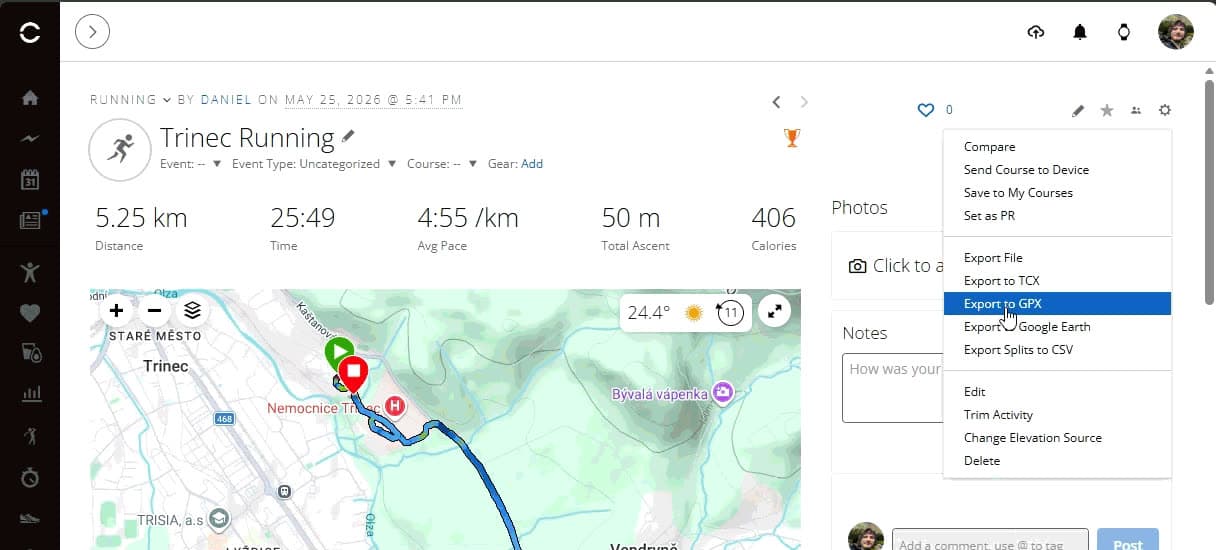
- In the left column, under the pencil icon, click the three dots.
- Choose Export GPX. The file is saved to your Downloads folder.
That's it. The file ends in .gpx and you can upload it on the create page right away.
When it doesn't work
I only have a phone
Open strava.com in your phone's browser and switch on Desktop site in the browser menu. Then follow the same steps. It is a bit fiddly, but it works.
I only see Export Original
Export Original downloads the file exactly as your watch uploaded it, often as a .fit file. For a relief you need Export GPX, which sits just above it in the menu.
I want a route someone else ran
Strava only lets you export GPX from your own activities. If it is meant as a gift, ask your friend for the file, or plan the same route yourself in a route planner and export that.
An even simpler way: paste the activity link
With us you don't really need the GPX file from Strava. On the create page, paste the link to the activity, for example https://www.strava.com/activities/123456789. Strava asks you to allow access to that one activity and the route loads by itself. We do not store the access token.
Tip: In the mobile app you can copy the activity link with Share and then Copy link.